DAM Migration Checklist for Companies With Multiple Asset Libraries
Moving digital assets from one system to another is rarely straightforward, and the challenge multiplies significantly when multiple asset libraries are involved. A DAM migration in this context requires careful planning, clear ownership, and a structured checklist that accounts for the complexity of managing assets across different teams, formats, and metadata conventions. Done right, a digital asset management migration creates a cleaner, more efficient foundation. Done carelessly, it can result in lost assets, broken workflows, and metadata chaos that takes months to untangle.
Mapping Your Existing Asset Libraries Before Migration
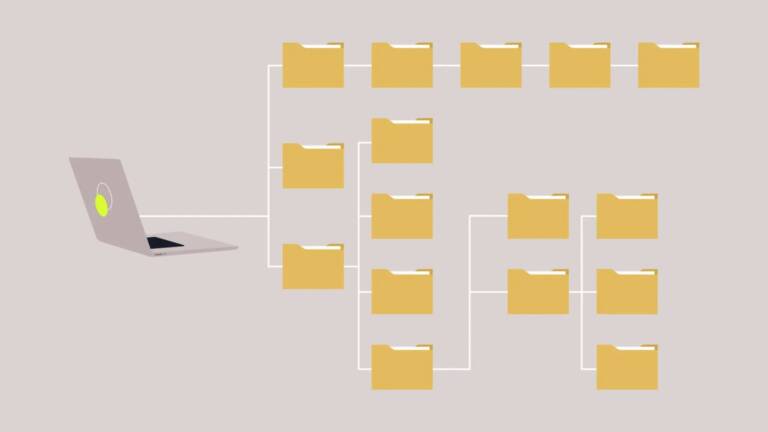
Before a single file moves, the most important step in any DAM migration is developing a complete picture of what exists across all current libraries. This means cataloging every asset repository in use, whether that is a shared drive, a legacy DAM system, a cloud storage folder, or a departmental archive. Each library should be documented with information about its owner, the asset types it contains, approximate volume, and how actively it is used.
This mapping phase also surfaces redundancies. Organizations managing multiple asset libraries often find significant duplication across departments, with the same logos, campaign images, or product visuals stored in several locations with slightly different versions. Identifying these overlaps before migration prevents them from carrying over into the new system and creating the same organizational problems in a new environment.
How Metadata Standards Determine Migration Success
Metadata is the backbone of any functional DAM system, and inconsistent metadata across multiple libraries is one of the most common reasons digital asset migrations underperform. When each library has been managed independently, it is common to find different naming conventions, tagging structures, and descriptive fields that do not align with one another.
Before migration begins, teams should define a unified metadata schema that will apply to all assets in the new system. This includes agreeing on required fields, controlled vocabularies for tags and categories, and naming conventions that will scale across the entire organization. Assets that do not meet the new metadata standard should be flagged for enrichment either before or immediately after migration, rather than being imported as-is and left to create search problems later. The quality of metadata directly determines how findable and usable assets will be once the new DAM is live.
Prioritizing Asset Libraries for Phased Migration
Attempting to migrate all asset libraries simultaneously is a high-risk approach, particularly for organizations with large or complex collections. A phased migration strategy allows teams to validate processes and resolve issues on a smaller scale before committing to a full rollout.
Prioritization should be based on a combination of business impact and migration complexity. Libraries containing actively used brand assets, current campaign materials, or assets tied to revenue-generating channels should typically move first, ensuring that critical workflows are not disrupted. Libraries with older, archival content or lower usage frequency can follow in later phases. This sequencing also gives teams time to refine the metadata schema and migration workflow based on real experience rather than assumptions.
Common DAM Migration Mistakes With Multiple Libraries
Several recurring mistakes tend to create the most significant problems during asset library migration. Understanding them in advance makes them avoidable rather than costly lessons learned after the fact.
- Skipping a pre-migration audit: Migrating assets without first auditing for duplicates, outdated files, and broken links results in a new system that inherits the disorder of the old one.
- Ignoring stakeholder input: The teams who use each library daily often have the clearest understanding of how assets are organized and what matters most. Excluding them from planning leads to a structure that does not match actual workflows.
- Underestimating the timeline: Multi-library migrations consistently take longer than initially projected. Building buffer time into the schedule prevents rushed decisions that compromise quality.
- Failing to test before go-live: A migration should include a testing phase where a representative sample of assets is validated in the new system before the full cutover.
- Neglecting user training: Even a well-executed migration fails to deliver value if the teams using the new DAM do not understand how to navigate it effectively.
Validating and Stabilizing Your New DAM Post-Migration
The work does not end when assets arrive in the new system. Post-migration validation is a critical phase that determines whether the DAM migration actually delivers on its goals. Validation should confirm that asset counts match expectations, that metadata has transferred accurately, that file formats have been preserved, and that permissions and access controls are functioning as intended.
Stabilization in the weeks following migration involves monitoring how teams interact with the new system, gathering feedback on search functionality and asset discoverability, and addressing any gaps that surface in real use. It is also the right moment to decommission the old libraries in a controlled way, ensuring that users are redirected to the new system rather than continuing to access outdated sources.
For organizations looking to build a strong post-migration foundation, platforms like ImageBank X offer the kind of integration flexibility that supports long-term stability. With connections to tools like Adobe, Microsoft 365, and Google Workspace, the DAM system fits into existing workflows rather than requiring teams to change how they work. If your organization is planning a digital asset migration in 2026, exploring how a modern DAM platform handles multi-library environments is a practical first step. You can try ImageBank X free for 30 days to see how it works with your own libraries, or contact us to learn more or request a demo.