Organizing Product Images Across International Teams
When a product launch spans multiple continents, the pressure on creative and marketing teams multiplies fast. Dozens of product images need to reach regional offices, agencies, and retail partners – often simultaneously, often under tight deadlines, and almost always with version control concerns lurking in the background. Organizing product images across international teams is far more complex than it might appear, and without a deliberate system in place, the cracks show quickly.
The good news is that the core challenges are well understood, and practical solutions exist. From scalable folder structures to dedicated digital asset management platforms, global teams have more tools than ever to bring order to their visual content operations. This article walks through the key strategies that make cross-border image management work in practice.
Why Product Image Chaos Costs Global Teams More
Disorganized product images are not just a minor inconvenience – they carry real operational and financial costs. When team members across different regions cannot find the right image quickly, they either waste time searching or, worse, use outdated or unapproved versions. Both outcomes erode efficiency and brand integrity at the same time.
Consider how these costs compound across an international organization. A marketing team in one region recreates assets that already exist elsewhere because they have no visibility into what has already been produced. Another team publishes imagery that has since been updated to reflect a product change. Multiply these incidents across dozens of markets and the cumulative impact on productivity and brand consistency becomes significant. Investing in proper product image organization is not a luxury – it is a baseline requirement for any team operating at global scale.
Folder Structures and Naming Conventions That Scale Globally
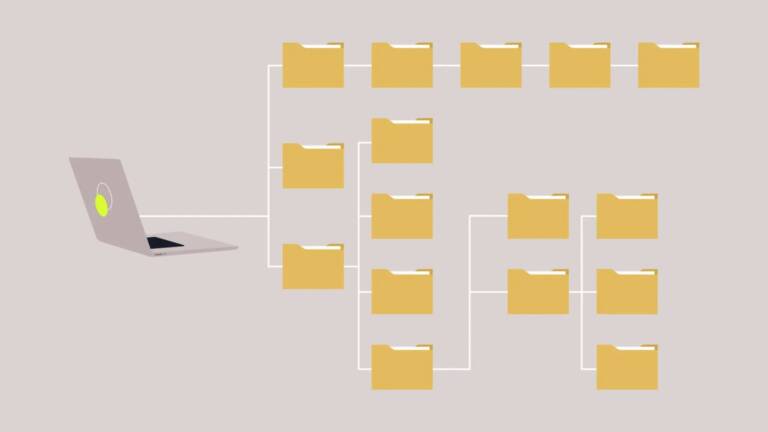
A logical, consistent folder structure is the foundation of any effective image management system. Without it, even a well-intentioned library becomes impossible to navigate as it grows.
The most effective folder hierarchies follow a clear and predictable logic – typically organized by product line, campaign, market, or content type, depending on how the organization primarily searches for assets. A structure like Product Category / Product Name / Market / Asset Type gives every team member an intuitive path to what they need, regardless of where they are based.
Naming conventions deserve equal attention. A filename like IMG_4892_final_FINAL_v3.jpg tells a colleague nothing useful. A convention such as ProductName_Market_AssetType_Version_Year.jpg communicates context instantly. Key principles for naming conventions that hold up across international teams include:
- Use only lowercase letters, numbers, and underscores – avoid spaces and special characters that behave differently across operating systems
- Include the market or language code to distinguish regional variants
- Always include a version indicator so teams can identify the most current file
- Keep names concise but descriptive – aim for clarity over brevity
Documenting these conventions in a shared style guide and enforcing them at the point of upload ensures the system remains consistent even as teams grow and change.
How a DAM System Streamlines Cross-Border Image Workflows
A digital asset management system transforms what would otherwise be a fragmented, email-heavy process into a centralized and automated workflow. Rather than hunting through shared drives or waiting for a colleague in another time zone to send a file, teams access a single source of truth for all approved product imagery.
The operational benefits go well beyond simple storage. A DAM system enables teams to:
- Search across thousands of assets using AI-powered tagging and metadata filtering
- Set permissions so regional teams access only the assets relevant to their market
- Automate approval workflows so updated images replace outdated versions without manual intervention
- Share assets directly with external partners, agencies, or retailers through controlled access portals
- Track asset usage to understand which images are performing and where
For cross-border collaboration specifically, the ability to access assets asynchronously is critical. Teams in different time zones cannot always coordinate in real time, so having a well-organized, always-available image library removes the bottleneck of waiting for someone to be online. The DAM system becomes the connective tissue between teams that may never share a working hour.
Keeping Brand Consistency Across Regional Markets
Brand consistency is one of the most difficult things to maintain when product image management is decentralized. Regional teams often adapt global assets to suit local tastes or requirements – a reasonable approach in principle, but one that quickly leads to visual fragmentation if not properly governed.
The solution is not rigid uniformity but structured flexibility. Global brand guidelines should define which elements of a product image are non-negotiable – color profiles, logo placement, approved product angles – while allowing regional teams to adapt supporting visuals within defined parameters. This balance preserves brand identity without stifling local relevance.
Centralized asset approval workflows play a key role here. When a regional team creates or adapts an image, routing it through a defined approval process before it enters the shared library ensures that only brand-compliant assets are distributed. Over time, this builds a library of pre-approved regional variants that teams can draw on without starting from scratch each time.
For brand, media, and communications teams managing large volumes of content across channels, having a central hub where logos, product images, and campaign templates are always current eliminates the guesswork about whether a file is approved for use. It also makes onboarding new partners or agencies significantly faster, since access to the right materials is immediate rather than dependent on internal handoffs.
Common Pitfalls When Managing Images Across Time Zones
Even well-structured systems encounter predictable failure points when teams are distributed across time zones. Recognizing these pitfalls early makes it much easier to design workflows that avoid them.
One of the most common issues is version confusion. When multiple teams are working on or adapting the same asset simultaneously, without a clear check-in and check-out process, conflicting versions can proliferate. Establishing a single authoritative version in the DAM system, with clear version history, prevents this from becoming a recurring problem.
Another frequent challenge is inconsistent metadata. If different team members tag and describe assets according to their own conventions, the searchability of the library degrades quickly. Standardizing metadata fields and making them mandatory at the point of upload is a straightforward fix that pays dividends at scale.
Other pitfalls worth watching for include:
- Relying on email or messaging apps to distribute assets, which creates untracked copies outside the central library
- Failing to archive or retire outdated assets, leaving teams uncertain about which version is current
- Granting overly broad access permissions, which can lead to accidental edits or deletions
- Underestimating onboarding time for new regional teams – without proper training, even a well-designed system will be underused
As international teams grow and product lines expand, the complexity of image management only increases. Building strong habits and governance structures early is far less costly than retrofitting them onto a chaotic library later.
For organizations ready to move beyond shared drives and fragmented workflows, platforms like ImageBank X offer the infrastructure to manage product images at global scale – bringing AI-powered search, structured permissions, and collaborative workflows together in one place. The goal is not just to store images, but to make the right image findable by the right person at exactly the right moment, wherever in the world they happen to be working.
Ready to see it in action? Try ImageBank X free for 30 days and explore how it can bring order to your product images. If you have questions or would like to talk through your team’s needs, get in touch with us and we will be happy to help.