Is your content slowing down product launches?
Faster launches start with connected content
How leading manufacturers automate catalog production?
Your product is ready for its next market. The launch date is set, distributors are on board, and marketing is preparing the campaign. Then the requests start. Where are the approved product images? Is the brochure available in the local language? Can the distributor use that video? Which installation guide should appear on the website?
Individually, these sound like small tasks but together, they can slow down a launch and weaken the experience customers have when they first encounter your product.
For manufacturers expanding internationally, content readiness deserves a place alongside product readiness. Images, videos, brochures and documents help turn a great product into something people can understand, evaluate and buy.
Every new market puts your content workflows to the test
Launching in another market means adapting how you introduce, explain and support your product. Local teams need relevant visuals and translated materials. Distributors need content for their websites and sales conversations. Customers need documents that help them make confident buying decisions.
Everyone should be able to work from the same approved source materials while adapting them to local needs. When those materials are scattered across folders, inboxes and separate systems, localization becomes harder to coordinate. Teams may translate an outdated brochure, commission images that already exist or publish materials that do not follow brand guidelines.
The challenge grows with every new market, partner and publishing channel.
The hidden delay is often between teams
Consider the journey of a single product image:
An agency delivers the original. Marketing approves it. A local team requests a different format. A distributor asks for access. Someone uploads a copy to the website and sends another by email.
Later, the image changes.
Who knows where the previous version went? Who is responsible for replacing it? How does each team find out that an update is available?
Much of the work happens between the tools people use. Employees become responsible for moving files, explaining their context and checking that others have the right version. These handovers make launch schedules harder to predict. They also leave less time for the work that improves campaign quality, local relevance and sales support.
Content availability shapes the buying experience
A launch can happen on time while still leaving customers without what they need.
A distributor may publish a product page with limited imagery because the full collection was difficult to access. A sales representative may send an old presentation because it was the easiest one to find. A customer may struggle to locate an installation guide or see inconsistent materials across channels.
These gaps affect how clearly your product’s value comes across. Useful content helps customers understand features, imagine applications and answer practical questions. Consistent, current materials also give partners a stronger foundation for presenting your brand. Making content accessible is therefore part of making your product easier to buy.
Give your content a connected lifecycle
To improve content readiness, look at what happens before and after a file is stored. How does content enter your organization? Who approves it? How do local teams find it? How does it reach publishing channels? What happens when it changes?
Digital asset management, or DAM, provides a central environment for managing product images, videos, documents and other digital assets. Connecting it with the surrounding tools and workflows helps support the full product content lifecycle.
Create with the next user in mind: Capture essential context when assets enter the workflow, including the relevant product, language, market, ownership and usage rights. This makes content easier to find and prepare for use later.
Make approved materials easy to identify: Use metadata, version control and clear approval practices so teams can confidently select content for their market and purpose.
Connect content to the people and channels that need it: Shared collections and brand portals help teams and partners access relevant assets independently. Integrations with websites, ecommerce platforms and marketing tools can reduce repeated downloads and uploads.
Learn from usage and reuse what works: Review which materials people access and download. Combine that information with channel performance data to understand where content supports your goals. Download activity shows demand for an asset, while channel metrics help assess its effect on audiences. Use those insights to guide localization, adapt successful materials and prioritize future production.
Think about the ecosystem around your product assets
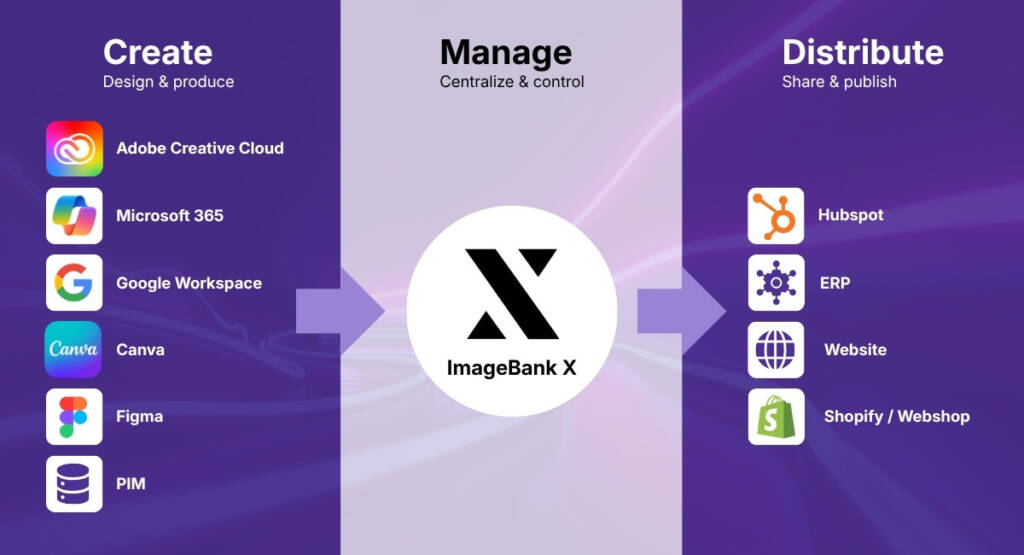
A central asset library is a useful foundation. The next question is how well it works with everything around it.
Your creative team needs to deliver approved work. Local marketers need to adapt it. Distributors need access to sales materials. Your website and ecommerce teams need assets ready for publication.
An ecosystem approach connects these needs. For example, an approved product image can be managed in DAM, made available to distributors through a portal and delivered to a website through an integration. The exact workflow depends on your systems, but the aim is consistent: reduce repeated handling while preserving the context that makes an asset usable. Clear responsibilities matter as much as the connections. Teams need to know who approves content, who maintains local versions and how updates reach each destination.
Start with one launch
Choose an upcoming product launch and follow the journey of its key assets. Look for the points where people wait, repeat work or lose confidence in what they can use.
Ask:
- Can every market find the approved materials independently?
- Is it clear which assets need localization and who owns that work?
- Can distributors access current content without requesting each file?
- How many times is the same asset manually transferred between systems?
- How will updates reach the places where the content is used?
These questions help identify where a connected workflow could make the biggest difference. Track the time from approval to publication, the effort spent fulfilling material requests and whether local teams have their assets ready before launch. These measures make progress visible.
Your content should help your product reach the market with a clear message, a consistent brand and the materials customers need to take the next step.
Give your great products every chance to win
Explore our guide to discover how a connected content lifecycle can help you launch faster, support local markets and get more value from your digital assets.